How to Sync tlblog with Obsidian
January 28, 2026
You can sync tlblog with your Obsidian folder directly. First, make sure you have downloaded a starter template, unzipped it, and opened it in an empty Obsidian vault.
When you're ready to sync, open tlblog and follow these steps:
Step 1: Click the Sync icon and select Sync to Folder.
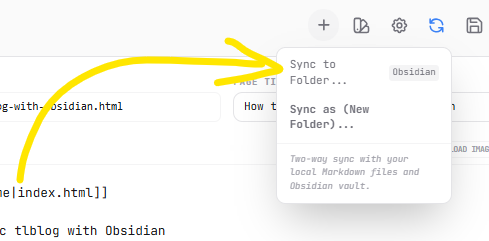
Step 2: Choose your Obsidian vault (folder) on your computer.
Step 3: tlblog will now watch your folder for changes.
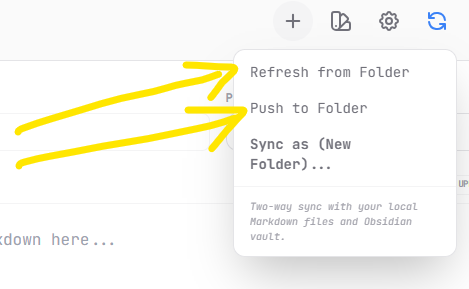
Once you connect your Obsidian folder, you can keep your work in harmony with two actions:
Refresh from Folder: Use this to bring any new changes you made in Obsidian directly into tlblog.
Push to Folder: Use this to save edits made inside tlblog back to your local file system and Obsidian vault.
This way, your writing stays updated in both places automatically.
Happy writing!